Memory Overview
What is NeoCash Memory?
NeoCash Memory is the system that allows your AI financial advisor to remember important details about your financial life across conversations. Instead of repeating yourself every time you start a new chat, NeoCash automatically builds a persistent understanding of your income, expenses, goals, and financial decisions.
Every piece of information is stored locally in your browser’s IndexedDB. Nothing is sent to a server or stored in the cloud.
How Memory Works
When you have a conversation with NeoCash, the AI listens for financially relevant information. If you mention your salary, a new investment, or a decision to refinance your mortgage, NeoCash extracts that information and saves it as a structured memory.
The next time you start a conversation, relevant memories are automatically injected into the AI’s context. This means the AI already knows your situation before you say a word.
The Memory Lifecycle
- Conversation — You discuss your finances naturally with the AI.
- Extraction — NeoCash identifies facts and decisions from your messages.
- Storage — Extracted memories are categorized and saved to IndexedDB.
- Injection — In future conversations, relevant memories are included in the AI’s system prompt.
- Application — The AI uses your stored context to give personalized advice.
Two Types of Memory
NeoCash organizes memories into two distinct types:
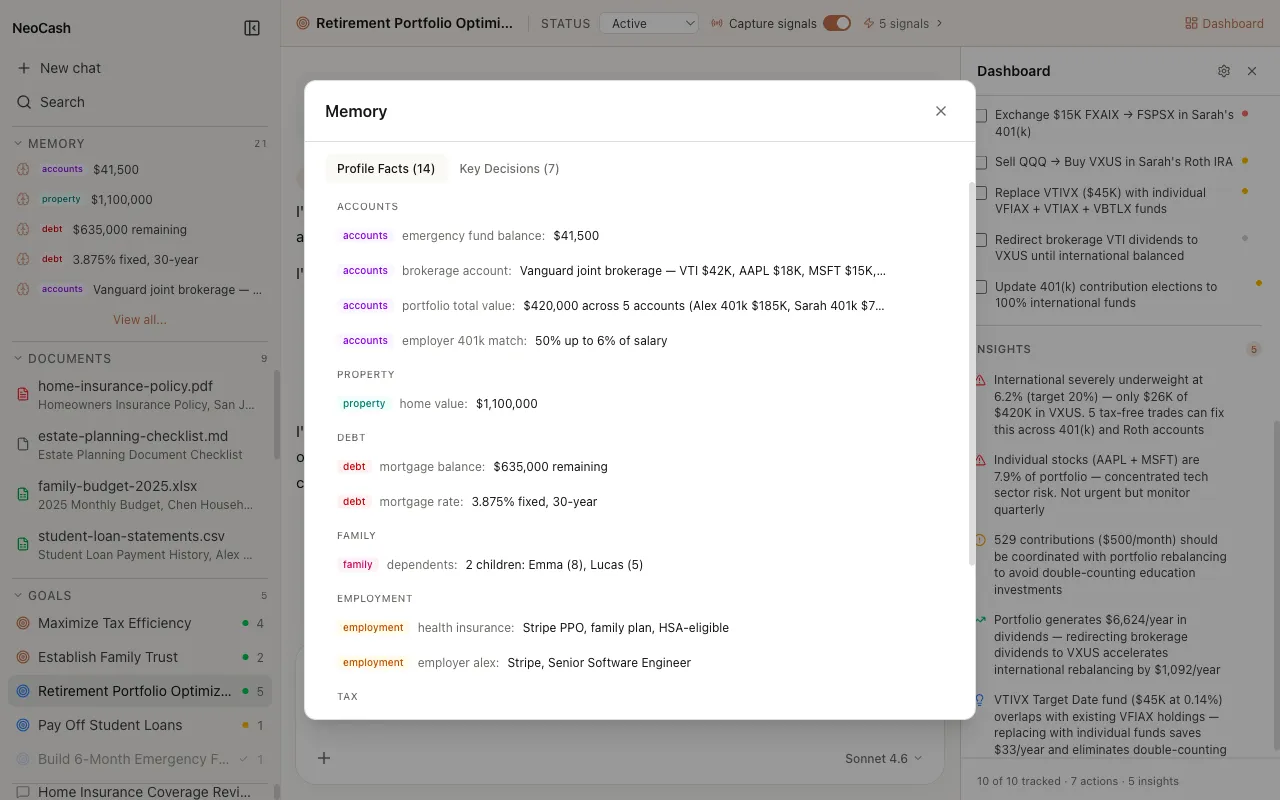
Profile Facts
These are biographical and financial facts about you. They represent your current state — things like your annual income, the value of your home, your tax filing status, or your risk tolerance. Profile facts are updated when your situation changes.
Key Decisions
These capture financial decisions you have made during conversations. When you decide to increase your 401(k) contribution, switch insurance providers, or set a new savings target, NeoCash records that decision along with the reasoning behind it.
Together, these two memory types give the AI a comprehensive picture of both who you are financially and the choices you have made over time.
Nine Categories
All memories are organized into nine categories that cover the full spectrum of personal finance:
- Income — Salary, bonuses, side income, investment returns
- Expenses — Monthly bills, subscriptions, discretionary spending
- Assets — Bank accounts, investments, real estate, vehicles
- Debts — Mortgages, student loans, credit cards, personal loans
- Insurance — Health, life, auto, home, disability coverage
- Tax — Filing status, deductions, credits, tax-advantaged accounts
- Family — Dependents, marital status, household financial dynamics
- Goals — Short-term and long-term financial objectives
- Preferences — Risk tolerance, investment style, communication preferences
The Memory Editor
You have full control over your memories through the Memory Editor. This tabbed interface lets you browse, edit, and delete any stored memory. The two tabs — Facts and Decisions — correspond to the two memory types.
From the editor you can:
- View all stored memories organized by category
- Edit any fact or decision to correct or update it
- Delete memories you no longer want the AI to use
- See when each memory was created or last updated
Privacy by Design
Your memories never leave your device. They are stored in the browser’s IndexedDB and are only used locally when constructing the AI’s system prompt. The only external communication is the API call to Anthropic, which includes relevant memories in the prompt context for that single request. No memory data is persisted on any server.
Getting Started
You do not need to configure anything to start using Memory. Simply have conversations with NeoCash about your finances, and the system will begin building your financial profile automatically. You can review what has been stored at any time through the Memory Editor.
Tips for Building Your Profile
- Start with the basics — Tell the AI about your income, major expenses, and financial goals in your first few conversations. This gives the memory system a solid foundation.
- Be specific with numbers — Concrete figures like “$125,000 salary” or “$2,200 monthly rent” create more useful memories than vague descriptions.
- Mention life changes — When your situation changes, let the AI know. Raises, new debts, family changes, and shifting goals should all be communicated so your profile stays current.
- Check the editor — Periodically review the Memory Editor to ensure accuracy and remove anything outdated.
For deeper details, see Facts & Decisions, Memory Categories, and Extraction & Injection.