Facts & Decisions
Two Types of Financial Memory
NeoCash separates your financial information into two distinct memory types: Profile Facts and Key Decisions. This separation allows the AI to distinguish between what is true about your situation and what you have chosen to do about it.
Profile Facts
Profile Facts represent the current state of your financial life. They are structured pieces of biographical and financial information that describe who you are, what you own, what you owe, and how you prefer to manage money.
What Makes a Good Fact
A profile fact is specific, factual, and represents a current state. Facts are not opinions or plans — they are concrete data points.
Examples of profile facts:
- Annual salary is $125,000 at Acme Corp
- Primary residence valued at $450,000
- Monthly rent expense is $2,200
- Filing taxes as married filing jointly
- Has two dependents under age 18
- Risk tolerance is moderate
- Holds a 401(k) with Fidelity, current balance $87,000
- Student loan balance is $34,500 at 4.5% interest rate
- Has term life insurance policy for $500,000
How Facts Are Updated
When your situation changes, NeoCash updates the relevant fact rather than creating a duplicate. If you get a raise, your income fact is updated to reflect the new salary. The AI handles this automatically during conversations — if you say “I just got promoted and my salary is now $140,000,” the system updates the existing income fact.
You can also manually edit facts through the Memory Editor at any time.
Fact Structure
Each profile fact includes:
- Category — Which of the nine categories it belongs to (Income, Expenses, Assets, etc.)
- Content — The factual statement itself
- Source conversation — Which chat the fact was extracted from
- Timestamp — When the fact was created or last updated
Key Decisions
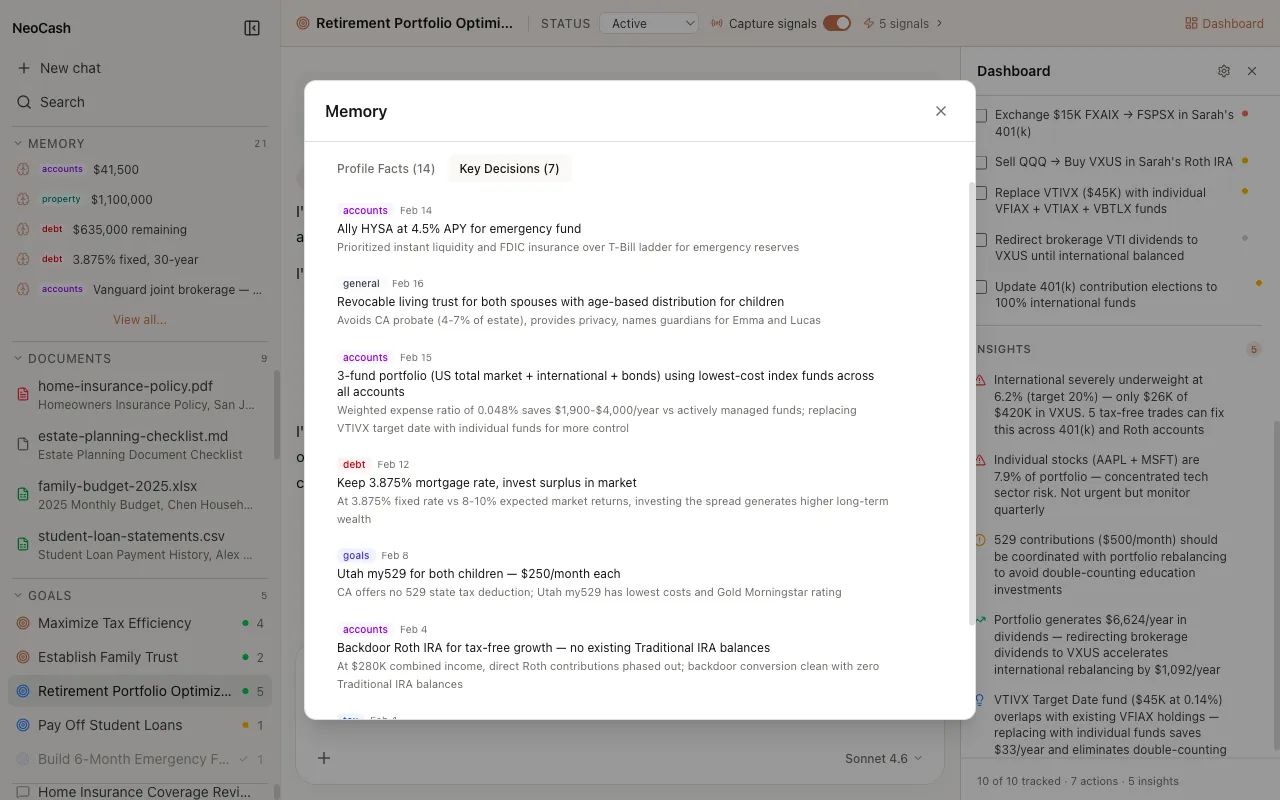
Key Decisions capture the financial choices you make during conversations with NeoCash. They record not just what you decided, but provide context about the reasoning and circumstances at the time.
What Makes a Decision
A decision represents an action you have chosen to take or a direction you have committed to. Decisions often emerge from analysis and discussion with the AI.
Examples of key decisions:
- Decided to increase 401(k) contribution from 6% to 10% starting next month
- Chose to refinance mortgage at 5.2% fixed rate, saving $280/month
- Decided to build a 6-month emergency fund before investing in taxable accounts
- Opted to switch from term to whole life insurance after reviewing coverage needs
- Committed to paying off credit card debt using the avalanche method
- Decided to open a 529 plan for each child with $200/month contributions
Why Decisions Matter
Decisions create a timeline of your financial journey. When you revisit a topic months later, the AI can reference your previous decisions and check on progress. This continuity prevents contradictory advice and helps the AI hold you accountable to your own plans.
For example, if you decided three months ago to pay off credit card debt before investing, the AI will remember that context if you later ask about opening a brokerage account.
Decision Structure
Each key decision includes:
- Category — Which financial category the decision relates to
- Content — A description of the decision made
- Source conversation — The chat where the decision was made
- Timestamp — When the decision was recorded
Facts vs. Decisions in Practice
Understanding the distinction helps you work more effectively with NeoCash.
| Aspect | Profile Facts | Key Decisions |
|---|---|---|
| Nature | Current state | Chosen action |
| Updates | Replaced when state changes | Accumulated over time |
| Example | ”Salary is $125,000" | "Decided to negotiate raise” |
| Persistence | Latest value kept | Historical record maintained |
| Purpose | Describes your situation | Tracks your choices |
The Memory Editor
The Memory Editor provides a tabbed interface for managing both types:
Facts Tab
Browse all profile facts organized by category. Each fact displays its content, category label, and last-updated timestamp. You can edit the content of any fact or delete facts that are no longer accurate.
Decisions Tab
View your decision history in chronological order. Decisions show the content, associated category, and the date they were recorded. You can delete decisions but typically should not edit them, since they represent historical choices.
Tips for Better Memories
- Be specific — Saying “I make about $125K” gives the AI a concrete fact to store. Vague statements like “I make decent money” are harder to extract.
- Mention changes — When something changes, tell the AI directly: “My rent went up to $2,400 this month.”
- State decisions clearly — Phrases like “I have decided to…” or “Let’s go with…” signal a decision to the extraction system.
- Review periodically — Check the Memory Editor every few weeks to ensure your stored information is current and accurate.