Custom Goals
Why Custom Goals?
The 32 preset prompts cover a wide range of common financial objectives, but your financial life may not fit neatly into a template. Custom goals let you describe any financial objective in your own words and have NeoCash set up a fully functional goal thread for it automatically.
Whether you want to plan for a sabbatical year, figure out stock option exercise strategy, prepare financially for adopting a child, or optimize your freelance income structure, custom goals handle it all.
Creating a Custom Goal
The process is straightforward.
Step 1: Describe Your Goal
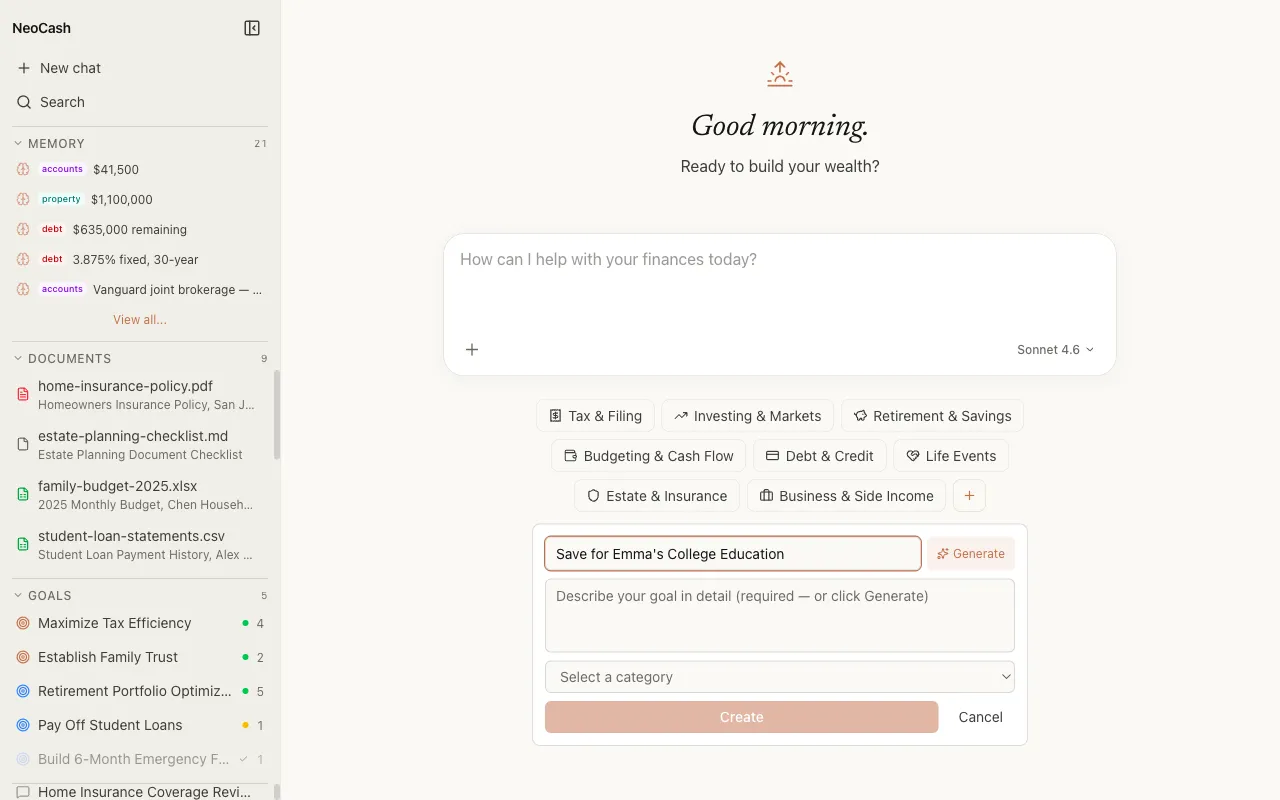
Open the goals screen and select “New Goal.” Instead of picking a preset prompt, type your financial objective into the text field. Be as specific or as general as you like. Here are some examples:
- “I want to figure out the best time to exercise my stock options before they expire next year.”
- “Help me plan financially for taking a 6-month career break.”
- “I need to decide whether to keep renting or buy a condo in my city.”
- “I want to set up a 529 plan for my kids’ college education.”
The more detail you provide up front, the better the AI can tailor its initial response. But you can always start broad and add specifics during the conversation.
Step 2: Review the Suggested Category
After you submit your goal description, NeoCash sends the text to the auto-categorization system. Within seconds, the AI analyzes your description and assigns it to one of the eight goal categories. You will see the suggested category displayed along with a brief explanation of why it was chosen.
For example, if you typed “Help me plan financially for taking a 6-month career break,” the system might categorize it as a Savings goal because the core objective involves accumulating funds for a specific short-term purpose.
Step 3: Accept or Override the Category
The suggested category is usually accurate, but you always have the option to change it. If you believe a different category better fits your intent, tap the category label and select a different one from the list.
Why might you override? Consider a goal like “Decide whether to buy rental property.” The auto-categorizer might assign this to Investment (since real estate is an investment), but you might prefer Savings (because your immediate focus is accumulating the down payment). The choice affects which dashboard layout and metrics your goal thread uses, so pick the category that matches your primary focus.
Step 4: Set a Title and Description
NeoCash generates a default title based on your input text, but you can edit it to something shorter or more memorable. The original text you typed becomes the goal description and is preserved as context for the AI conversation.
Good titles are brief and action-oriented:
- “Stock Option Exercise Plan” instead of “I want to figure out the best time to exercise my stock options before they expire next year”
- “Career Break Fund” instead of “Help me plan financially for taking a 6-month career break”
- “Rent vs. Buy Decision” instead of “I need to decide whether to keep renting or buy a condo in my city”
Step 5: Start the Conversation
Once you confirm the category and title, NeoCash creates the goal and opens a conversation thread. The AI sends an initial response that acknowledges your objective, asks relevant follow-up questions, and begins outlining a framework for achieving the goal.
From here, the experience is the same as any goal thread. Your dashboard populates as you provide information, action items appear as the AI identifies next steps, and cross-pollination signals will surface if this goal connects to your other active goals.
Tips for Effective Custom Goals
Be Specific About Your Situation
The AI works best when it understands your context. Instead of “Help me save money,” try “I earn $75,000 and want to save $20,000 in the next 18 months for a down payment while also paying $400/month on student loans.” The more the AI knows up front, the fewer back-and-forth questions are needed.
One Objective Per Goal
Keep each goal focused on a single financial objective. If you have related but distinct goals, create separate goal threads for each. For example, “Pay off credit card debt” and “Build an emergency fund” should be two separate goals, even though they are related. The cross-pollination signal system will detect the connection between them automatically.
Use Natural Language
There is no special syntax or formatting required. Write the way you would explain your financial goal to a knowledgeable friend. The auto-categorization system understands natural language and will classify your goal correctly in the vast majority of cases.
Revisit and Refine
Goals are living threads. As your situation changes, continue the conversation. Update the AI on new developments, changing priorities, or progress you have made. The dashboard and action items will evolve with your conversation.
How Custom Goals Differ from Presets
The end result is identical. Both custom goals and preset prompt goals produce a categorized goal thread with a tailored dashboard, action items, AI insights, and cross-pollination signals. The only difference is the starting point: presets give you a curated prompt, while custom goals let you define the objective yourself. Under the hood, both paths create the same goal structure.