Goals Overview
What Are Goals in NeoCash?
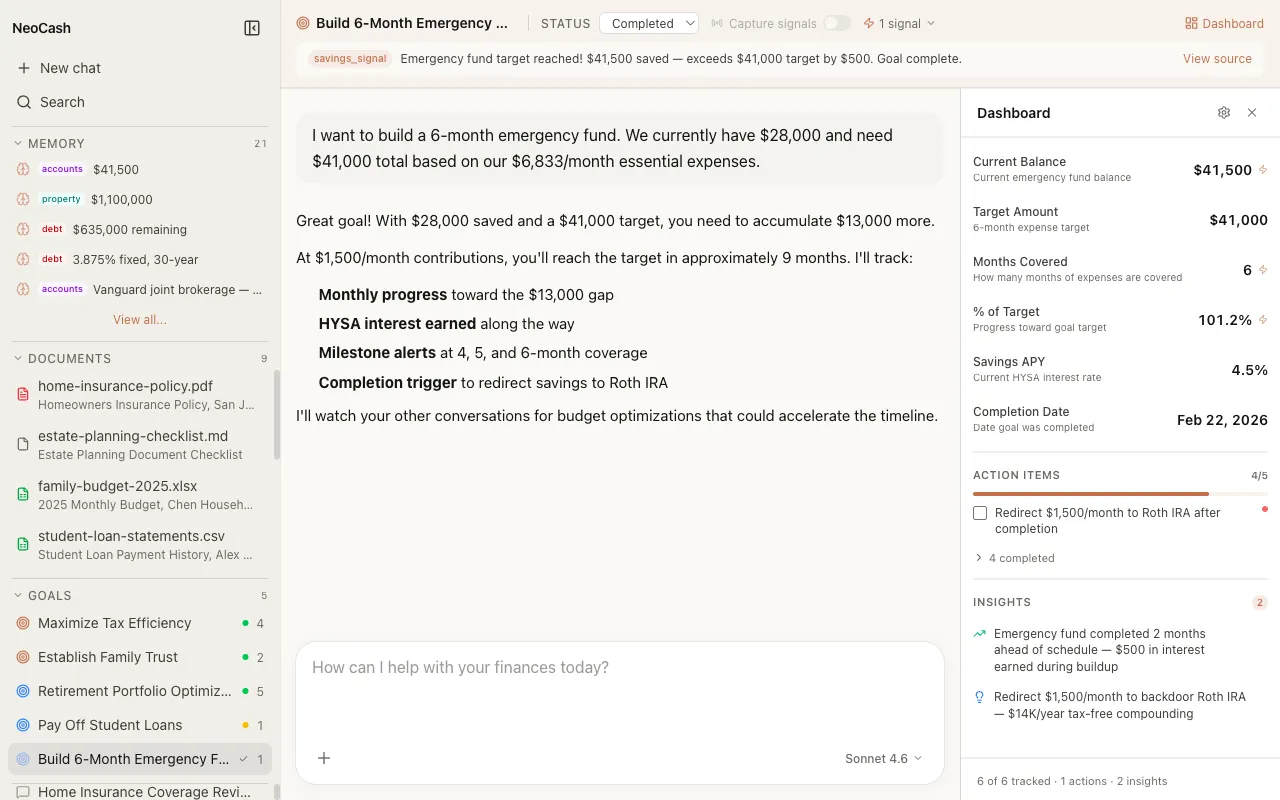
Goals are the central organizing unit in NeoCash. Unlike a general-purpose chat where you ask one-off financial questions, a goal represents a specific financial objective you want to achieve over time. Each goal combines three powerful capabilities into a single thread: conversational AI guidance, a live dashboard with tracked metrics, and cross-goal signals that surface connections you might miss on your own.
Think of a goal as a dedicated workspace for one financial priority. Whether you are building an emergency fund, paying off student loans, or planning for retirement, each goal keeps your conversations, progress data, and action items together in one place.
How Goals Differ from Regular Chats
A regular chat session is ephemeral. You ask a question, get an answer, and move on. Goals are persistent and evolving. Here is what makes them different:
- Persistent context: Every message you send within a goal thread builds on your previous conversation. The AI remembers your situation, preferences, and progress.
- Typed dashboards: Each goal comes with a dashboard tailored to its category. An emergency fund goal tracks your target amount and monthly contributions. A debt payoff goal tracks balances, interest rates, and payoff timelines.
- Action items: Goals generate concrete next steps you can check off as you make progress.
- AI insights: The system periodically surfaces observations about your goal, such as suggesting you increase contributions or alerting you to a change in strategy.
- Cross-pollination signals: Goals do not exist in isolation. NeoCash detects relationships between your goals and notifies you when progress on one goal affects another.
The Goal Lifecycle
Every goal in NeoCash follows a natural lifecycle with four stages.
1. Create
You start a goal in one of two ways. You can pick from 32 preset prompt templates organized across eight financial categories, or you can type a custom goal description and let the AI auto-categorize it for you. Either way, you end up with a named goal assigned to the right category.
2. Chat
Once your goal is created, you enter a conversation thread. This is where you describe your financial situation, ask questions, explore strategies, and get personalized guidance. The AI adapts its advice based on your goal category and the context you provide.
3. Track
As your conversation progresses, NeoCash populates a dashboard with relevant metrics. You will see key figures like target amounts, current progress, projected timelines, and completion percentages. Action items appear as concrete tasks you can mark complete. AI insights highlight opportunities or risks the system has detected.
4. Achieve
When you reach your goal, the thread remains available as a reference. You can review the conversation history, see the full timeline of your progress, and use the insights you gained to inform future goals.
Dashboards and Metrics
Each goal category has a dashboard designed for that type of financial objective. The dashboard is not a generic progress bar. It surfaces the specific metrics that matter for your goal type.
For example, a Debt Payoff goal dashboard might show your remaining balance, monthly payment amount, interest rate, projected payoff date, and total interest saved by paying extra. A Retirement goal dashboard might show your current portfolio value, annual contribution rate, projected retirement age, and estimated monthly income in retirement.
Dashboards update as you provide new information through your goal conversations. They also reflect action items the AI has suggested and whether you have completed them.
Cross-Pollination Signals
One of the most powerful features of the goals system is cross-pollination. NeoCash continuously analyzes your active goals to detect meaningful connections between them.
For instance, if you have both an Emergency Fund goal and a Debt Payoff goal, the system might signal that completing your emergency fund frees up monthly cash flow you can redirect toward debt repayment. Or if you have a Tax Planning goal alongside an Investment goal, it might identify that a specific investment strategy also reduces your tax liability.
Signals appear as notifications within your goal threads. They help you see your finances as an interconnected system rather than a collection of isolated objectives.
Local-First Storage
All of your goals, conversations, dashboards, and signals are stored locally in your browser using IndexedDB. Nothing is sent to a remote server for storage. This means your financial data stays on your device, and you maintain full control over it at all times. You can export or delete your data whenever you choose.
Getting Started
The fastest way to begin is to browse the preset prompts. Open the goals screen, pick a category that matches your most pressing financial priority, and select a prompt that resonates. You will be in a goal conversation within seconds. From there, the AI will guide you through the process of defining your target, building a plan, and tracking your progress.
If none of the presets fit, type your own goal description. The auto-categorization system will classify it and set up the appropriate dashboard for you. See the Custom Goals and Auto-Categorization pages for more details on how this works.