Tool Calls
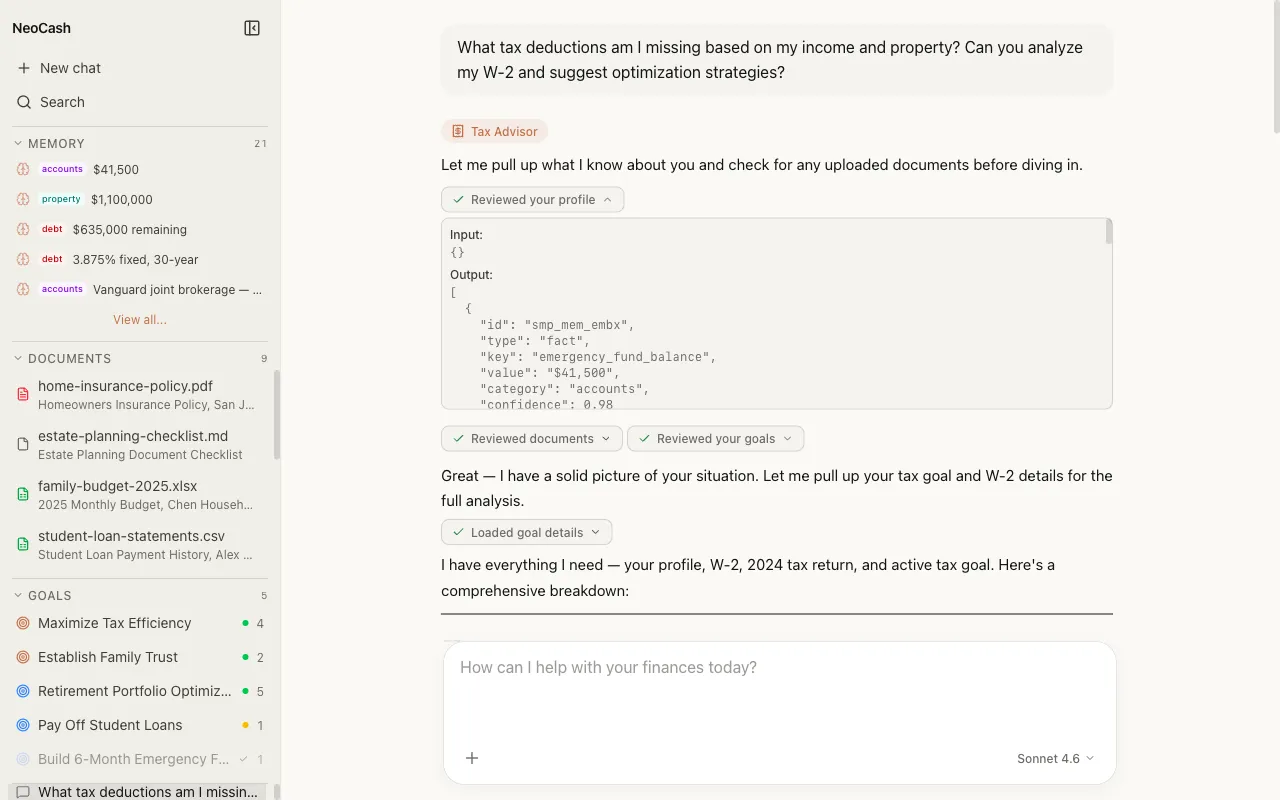
What Are Tool Calls
Tool calls are actions the AI takes during a conversation to fetch data, run calculations, or interact with other parts of the NeoCash system. When the AI determines that answering your question requires more than its own knowledge — such as performing a precise financial calculation or looking up current market data — it invokes a tool to get the job done.
Think of tools as specialist capabilities the AI can call on. Rather than approximating a compound interest calculation from memory, the AI calls a dedicated financial calculator tool that returns an exact result. This makes responses more accurate and more useful for real financial decisions.
How Tool Calls Appear in Chat
When the AI uses a tool during a response, you see it happen in real time. The streaming response pauses briefly, and an expandable tool call block appears inline. This block shows:
- Tool name — Which tool was invoked (e.g., “Financial Calculator” or “Web Research”)
- Input parameters — What data the AI sent to the tool
- Status indicator — A spinner while the tool is executing, then a checkmark when complete
- Result — The data returned by the tool, visible when you expand the block
After the tool returns its result, streaming resumes and the AI incorporates the tool’s output into its response. The final answer weaves the tool result naturally into the conversation.
Expandable Blocks
Tool call blocks are collapsed by default to keep the conversation readable. You can expand any tool call to inspect the inputs and outputs. This transparency lets you verify what data the AI used and how it arrived at its conclusions.
Multiple tool calls can occur in a single response. For example, the AI might call a financial calculator, then a goal update tool, all within one answer. Each tool call gets its own expandable block.
Types of Tools
NeoCash provides the AI with several categories of tools, each designed for specific financial tasks.
Financial Calculators
Dedicated tools for precise financial math:
- Compound interest calculator — Projects growth over time with configurable rates, contributions, and compounding periods
- Loan amortization — Generates payment schedules for mortgages, auto loans, and personal loans
- Tax bracket calculator — Computes federal and state tax liability across brackets
- Retirement projector — Models retirement readiness with variables for savings rate, returns, inflation, and withdrawal strategy
- Net worth calculator — Aggregates assets and liabilities for a current snapshot
These tools return precise numerical results that the AI then interprets and explains in context.
Web Research
When your question involves current information that goes beyond the AI’s training data, the web research tool fetches up-to-date data:
- Current interest rates and market indices
- Recent tax law changes and IRS updates
- Economic indicators and market trends
- Financial product comparisons and current offers
The AI cites its sources when using web research, so you can verify the information independently.
Document Analysis
Tools that work with uploaded documents:
- Text extraction — Pulls structured text from PDFs, Word, and Excel files
- Table parsing — Identifies and extracts tabular data from financial statements
- Figure identification — Locates key financial figures like totals, rates, and balances
- Cross-reference — Compares data points across multiple uploaded documents
These tools enable the AI to work with your actual financial documents rather than relying on descriptions you provide.
Goal Operations
Tools that interact with the NeoCash Goals system:
- Create goal — Sets up a new financial goal with target amount, timeline, and strategy
- Update progress — Records contributions or milestone achievements toward a goal
- Goal analysis — Evaluates whether you are on track and suggests adjustments
- Goal comparison — Compares multiple goals to help with prioritization
When the AI uses a goal tool, the changes are reflected in your Goals dashboard immediately.
Memory Operations
Tools that read from and write to your persistent financial memory:
- Store fact — Saves a key financial detail (income, account type, risk tolerance) for future reference
- Recall context — Retrieves stored information relevant to the current question
- Update fact — Modifies a previously stored detail when your situation changes
Memory operations happen transparently. The AI stores information it considers important for ongoing financial advice, and retrieves it automatically when relevant to a new question.
Tool Call Visualization
The visual design of tool calls in chat is intended to be informative without being intrusive.
During Execution
While a tool is running, you see:
- A labeled block showing the tool name
- A brief description of what the tool is doing
- An animated indicator showing the tool is in progress
After Completion
Once the tool finishes:
- The block shows a success indicator
- The block is collapsible — click to see full details
- The AI’s response continues with the tool’s result incorporated
Error Handling
If a tool call fails (for example, a web research request times out), the AI acknowledges the failure and either retries, uses an alternative approach, or explains what happened. Tool failures are visible in the tool call block so you understand why a particular piece of data might be missing.
Tool Calls and Model Selection
All three Claude models (Sonnet, Haiku, Opus) can use tools, but they differ in how effectively they leverage them:
- Haiku uses tools efficiently for straightforward tasks — single calculations, simple lookups
- Sonnet handles multi-tool workflows well, chaining several tool calls to build a comprehensive answer
- Opus excels at complex tool orchestration, knowing when to use multiple tools in sequence and how to synthesize their results into nuanced analysis
For questions that require multiple tool calls — such as “Compare my current mortgage with refinancing options and show the tax impact” — Sonnet or Opus will produce better results because they manage the multi-tool workflow more effectively.
For Developers
If you are building on or extending NeoCash, the tool call system follows Anthropic’s tool use specification. Each tool is defined with a JSON schema describing its parameters and return type. The AI receives these definitions as part of its system prompt and decides autonomously which tools to call based on the user’s question.
Tool results are returned in structured format and injected back into the conversation context, allowing the AI to reason about the results before composing its response. This architecture supports adding new tools without modifying the core chat logic — define the schema, implement the handler, and the AI begins using it automatically.