Streaming & Models
Real-Time Streaming
NeoCash streams AI responses in real time as they are generated. Rather than waiting for a complete response to appear all at once, you see text flowing onto the screen word by word. This provides several benefits:
- Faster perceived response time — You begin reading useful information within seconds, even for complex analyses
- Early course correction — If the response is heading in the wrong direction, you can see it immediately and refine your question
- Natural reading pace — The streaming speed roughly matches comfortable reading speed, so you stay engaged with the content as it arrives
During streaming, a subtle indicator shows that the AI is still generating. You can scroll up to review earlier parts of the response while new content continues to appear at the bottom.
The Model Selector
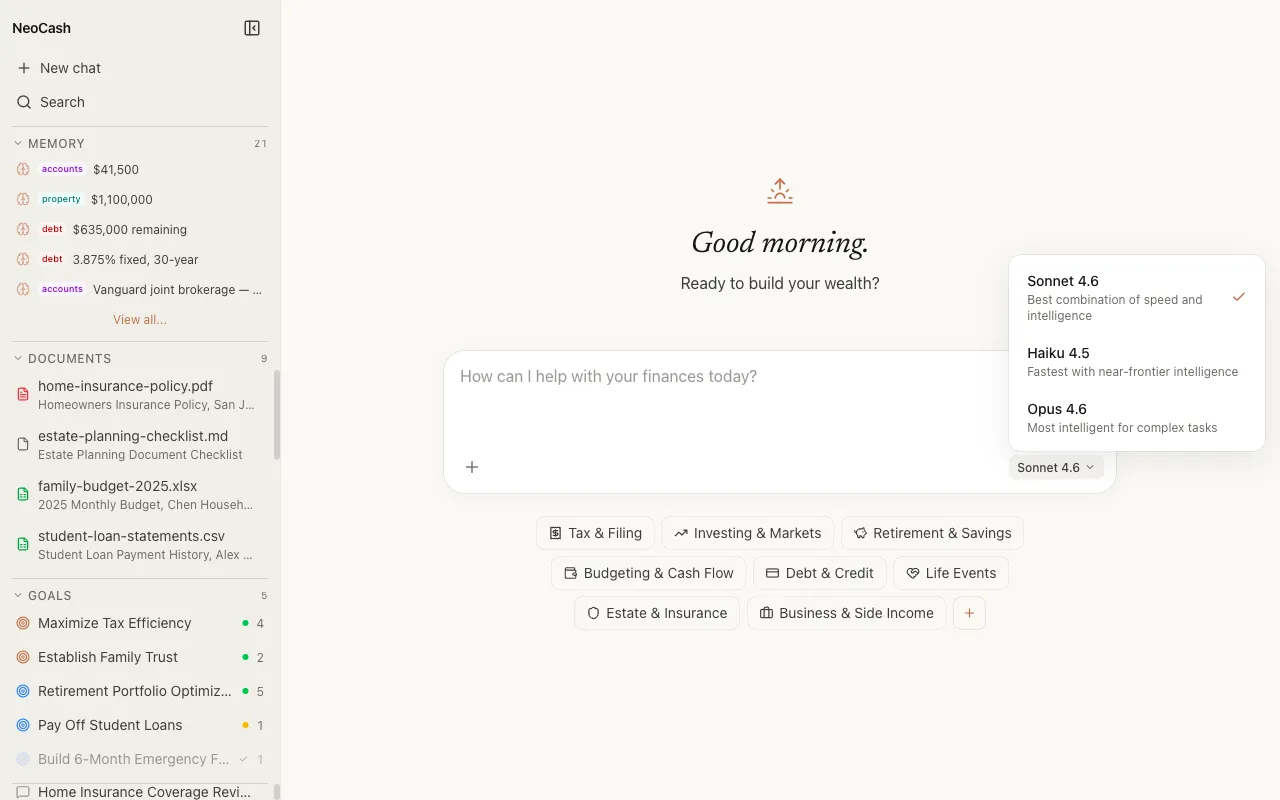
NeoCash gives you the ability to choose which Claude model powers your conversation. The model selector is located near the message input area and lets you switch between three options:
- Claude Sonnet — The balanced default
- Claude Haiku — The speed-optimized model
- Claude Opus — The depth-optimized model
Changing the model applies to the next message you send. You can switch models mid-conversation if your needs change — for instance, starting with Haiku for quick questions and switching to Opus when you need deep analysis.
Claude Sonnet: The Balanced Choice
Sonnet is the default model and the right choice for most interactions. It provides strong analytical capability with responsive speed, making it ideal for everyday financial questions and planning tasks.
Best for
- General financial Q&A
- Goal planning and progress reviews
- Budget analysis and spending breakdowns
- Document summaries and key figure extraction
- Most day-to-day wealth management conversations
Characteristics
- Responds quickly while maintaining high-quality reasoning
- Handles multi-step financial calculations accurately
- Provides well-structured, comprehensive answers
- Balances detail with conciseness
Claude Haiku: Speed First
Haiku is designed for speed. It returns responses significantly faster than Sonnet, making it ideal for quick lookups, simple calculations, and situations where you need rapid answers without deep analysis.
Best for
- Quick factual questions (“What is the 2026 401k contribution limit?”)
- Simple calculations and conversions
- Short clarifications on financial terms
- Rapid brainstorming or list generation
- Situations where you are iterating quickly and need fast feedback
Characteristics
- Fastest response times of all three models
- Concise, direct answers
- Well-suited for straightforward tasks
- Lower cost per message, which matters at scale
Tradeoffs
Haiku trades some analytical depth for speed. For complex multi-factor analyses, retirement projections, or nuanced tax strategy, Sonnet or Opus will provide more thorough reasoning.
Claude Opus: Maximum Depth
Opus is the most capable model available. It excels at complex reasoning, multi-step analysis, and situations that require synthesizing large amounts of information. When you need the AI to think deeply about your financial situation, Opus is the right choice.
Best for
- Complex tax optimization strategies across multiple accounts
- Comprehensive retirement planning with multiple variables
- Detailed investment analysis comparing many options
- Situations where extended thinking mode is valuable
- Cross-referencing multiple uploaded documents
- Scenarios requiring nuanced judgment about tradeoffs
Characteristics
- Deepest analytical reasoning
- Best at handling complex, multi-part questions
- Most thorough exploration of edge cases and considerations
- Pairs well with extended thinking mode for transparency into its reasoning process
Tradeoffs
Opus takes longer to respond than Sonnet or Haiku. The additional time is spent on more thorough reasoning, which is valuable for complex tasks but unnecessary for simple queries.
Choosing the Right Model
A practical framework for model selection:
| Situation | Recommended Model |
|---|---|
| Quick question with a known answer | Haiku |
| General financial planning | Sonnet |
| Analyzing an uploaded document | Sonnet |
| Complex multi-year tax strategy | Opus |
| Comparing retirement scenarios | Opus |
| Checking a single calculation | Haiku |
| First draft of a financial plan | Sonnet |
| Deep review of a financial plan | Opus |
You can change models at any point in a conversation. The AI will continue with full context from previous messages regardless of which model generated them. There is no penalty for switching — the context carries over seamlessly.
Streaming and Tool Calls
When the AI uses tools during streaming (such as running a financial calculation or performing web research), the stream may pause briefly while the tool executes. You will see an indicator showing which tool is running. Once the tool returns its result, streaming resumes with the AI incorporating the tool’s output into its response. See the Tool Calls documentation for more detail on this process.