Chat Overview
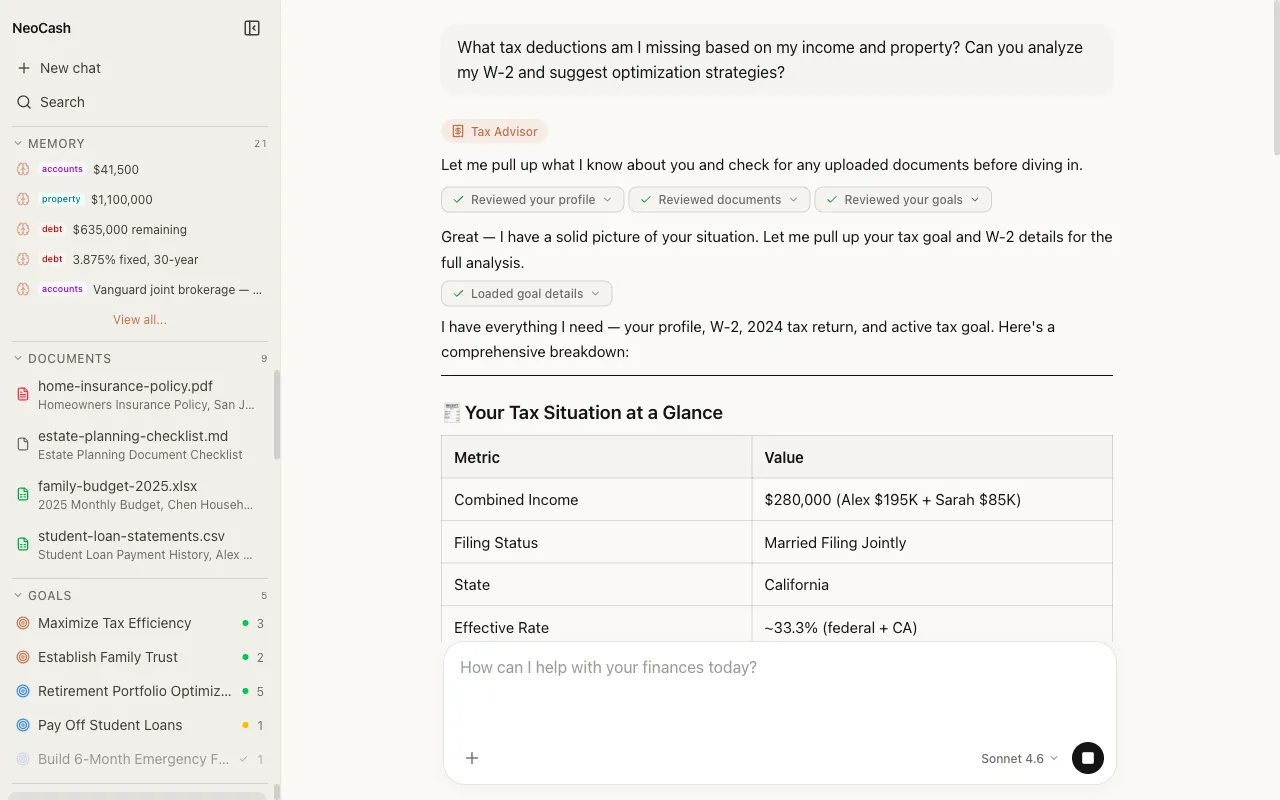
Your Financial Command Center
The Chat interface is the central hub of NeoCash. Every financial question, analysis request, and planning session flows through a single conversational interface powered by Anthropic’s Claude AI. Rather than navigating complex menus or dashboards, you simply describe what you need in natural language and receive intelligent, context-aware responses.
Chat is not just a question-and-answer tool. It is the connective tissue between every part of NeoCash — your goals, your documents, your financial memory, and the specialist agents that handle different aspects of your wealth management.
How Chat Connects to Everything
Goals
When you discuss financial targets in chat, the AI can create, update, and track goals on your behalf. Ask about retirement planning, and the system understands your existing goals, progress, and timelines. Changes made through chat are reflected immediately in your Goals dashboard.
Memory
NeoCash maintains a persistent financial memory that grows over time. When you mention your risk tolerance, preferred investment strategies, or financial milestones, the AI stores these details locally. In future conversations, it draws on this memory to provide personalized advice without you having to repeat yourself.
Documents
Financial documents uploaded in chat — tax returns, investment statements, loan agreements — become part of your analytical context. The AI extracts key figures, identifies trends, and references specific documents when answering your questions.
Signals
Market signals and financial alerts feed into your conversations. When you ask about market conditions or portfolio impacts, the AI incorporates real-time signal data to ground its responses in current information.
The Role of AI Agents
Behind every chat response is a routing system that directs your question to the most qualified specialist agent. NeoCash employs five agents, each with deep expertise in a specific financial domain:
- Wealth Strategist — Long-term planning, portfolio allocation, and goal-based strategy
- Tax Advisor — Tax optimization, deduction identification, and filing guidance
- Budget Analyst — Spending patterns, cash flow management, and budgeting
- Market Research — Market analysis, investment research, and economic trends
- Document Analyst — Financial document parsing, extraction, and cross-referencing
You do not need to select an agent manually. The system reads your message, determines which agent is best suited, and routes automatically. A small chip on each response tells you which agent handled it, giving you transparency into the decision-making process.
Privacy-First by Design
Every conversation you have in NeoCash stays on your device. Messages are stored in your browser’s IndexedDB — a local database that never transmits your financial data to external servers for storage. Your conversation history, financial memory, and uploaded documents remain entirely under your control.
When the AI processes your messages, only the current conversation context is sent to the Claude API for response generation. No conversation data is retained on Anthropic’s servers after the response is returned. This architecture means you get the full power of frontier AI models without sacrificing ownership of your financial information.
What You Can Do in Chat
Here are some examples of what the chat interface handles:
- Ask financial questions — “What is the tax impact of converting my traditional IRA to a Roth?”
- Analyze documents — Upload a bank statement and ask for a spending breakdown
- Plan goals — “Help me create a plan to save $50,000 for a down payment in 3 years”
- Run calculations — “Compare a 15-year vs 30-year mortgage at current rates for a $400K home”
- Research markets — “What sectors have outperformed in the last quarter?”
- Get personalized advice — The AI draws on your stored memory and past conversations to tailor its guidance
Getting Started
To begin a conversation, click the compose button or type directly into the message input at the bottom of the chat panel. Your first message starts a new conversation, which is automatically titled based on the topic you discuss. From there, the AI responds in real time with streaming text, and you can continue the thread as long as you need.
For more details on specific features, explore the other pages in this section covering conversations, streaming and models, file uploads, extended thinking, and tool calls.